
Documentation/Getting started
Guide 02Getting started
Install the app, understand permissions, and make your first useful paste.
Before you begin
You need macOS 14 or later. Choose the download for Apple Silicon or Intel. If you are unsure, open Apple menu → About This Mac: an Apple M-series chip means Apple Silicon; an Intel processor means Intel.
Pocket Paste offers a 7-day trial. Current purchase options are listed on the pricing page.
Install Pocket Paste
- Download the app from the homepage.
- Open the downloaded
.dmgand drag Pocket Paste into Applications. - Launch the copy in Applications. Use the Pocket Paste menu bar item to reach Clipboard and Settings.
- Follow the onboarding prompts. If you already have a saved configuration, the app may keep your existing preferences.
Review permissions
Accessibility enables text expansion and direct paste into other apps. Open System Settings → Privacy & Security → Accessibility, and enable your installed Pocket Paste application when prompted by the app.
Capturing clipboard history and inserting text into another app are separate actions. If you can see copied items but cannot paste directly, check Accessibility and the target app’s focused input field.
Only grant a permission for a feature you intend to use. The app’s permission guidance explains any additional request made by your macOS version or selected feature.
Try your first paste
- Open a new test document in TextEdit.
- Type
First ideaand copy it with Command + C. - Type and copy
Second idea. - Put the insertion point where you want the first idea to appear.
- Open Pocket Paste. The fresh-install shortcut is Control + Option + Z; check Settings → Shortcuts → Open Clipboard if yours differs.
- Search for
First idea, select it and press Return.
Expected result: the first idea appears in the document, even though you copied the second one more recently.
Make one small adjustment
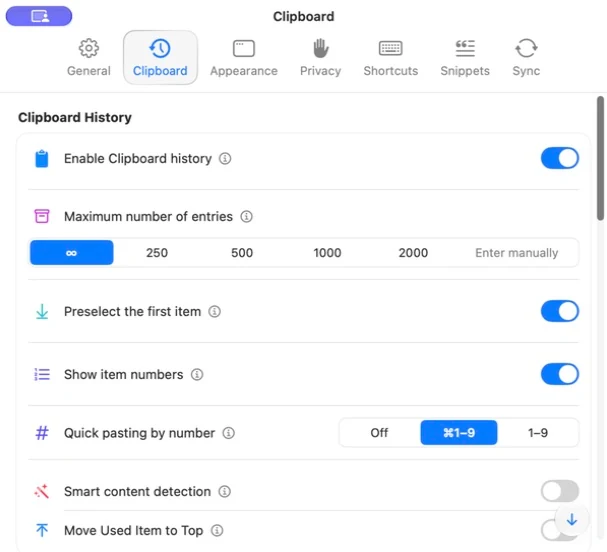
Open Settings → Clipboard to review history retention. Choose an appropriate limit or keep unlimited history if that suits your needs. Retention and storage size are different: images may need much more disk space than text.
If it does not work
- No new items: check that Clipboard History is enabled and capture is not paused. Use a normal text field in an app that is not excluded.
- Popup does not open: check the saved shortcut and conflicts with other utilities. Try the menu bar command.
- Item appears but will not paste: focus a writable field and review Accessibility. As a fallback, copy the item and use Command + V in the target app.
Continue with Clipboard history or Create a snippet.